
Unofficial AO3 Bookmark Manager for Readers
Overview
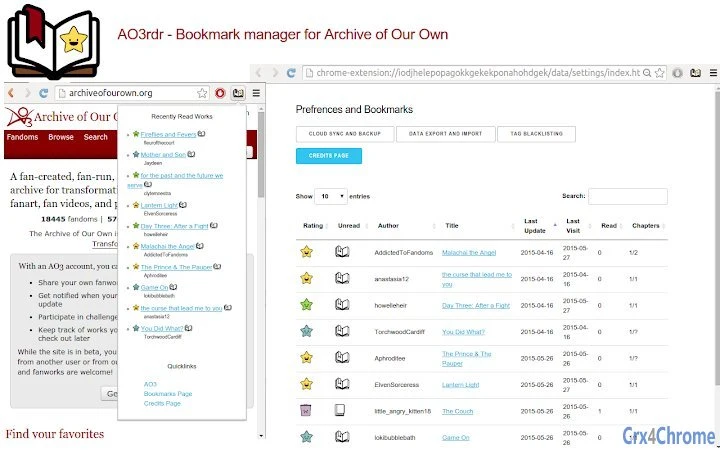
The software is an unofficial bookmark manager tailored for users of Archive of Our Own (AO3), a popular fanfiction platform. Designed to enhance the reading experience, it allows users to track their progress across multiple works, organize content, and maintain personal reading lists. Key functionalities include a three-star rating system, the ability to hide works, and blacklisting by tags—features that help readers filter out content they no longer wish to engage with.
The tool also supports bookmarking by chapter read, enabling precise tracking of reading progress. Users can monitor their last visit to each work, ensuring they return to where they left off. Built with data privacy in mind, the software includes backup and restore capabilities and supports cloud sync for seamless access across devices.
As an open-source project, its code is publicly available, promoting transparency and community contributions. The software is intended for dedicated AO3 readers who want a more structured and efficient way to manage their reading journey.
Key Features & Capabilities
- Three-star rating system – Users can rate works they’ve read with one to three stars, helping them quickly identify favorites or works they found less engaging.
- Hide works – A simple toggle to hide specific works from view, useful for removing distractions or content no longer of interest.
- Blacklist by tags – Automatically filter out stories containing specific tags, allowing users to avoid content that doesn’t align with their preferences.
- Bookmark by chapter read – Save the exact chapter a user has read, ensuring they can resume reading from the correct point across sessions.
- Track last visit – The software logs when a user last accessed a work, helping them remember which stories to return to.
- Backup and restore user data – Users can export their reading data for safekeeping and restore it when reinstalling or switching devices.
- Cloud sync – Enables synchronization of bookmarks, ratings, and reading history across multiple devices, maintaining consistency regardless of platform.
- Open source code – The project’s source code is publicly available, promoting transparency, trust, and community-driven improvements.
These features collectively support a more personalized and efficient reading workflow. For example, a user reading multiple fanfiction series can use the chapter bookmarking and last visit tracking to avoid confusion. The blacklist by tags feature is especially useful for readers who want to avoid certain themes or tropes. Cloud sync ensures that reading progress is preserved across a desktop, laptop, and tablet. The open-source nature invites developers and privacy-conscious users to inspect the code, ensuring no hidden data collection occurs.
User Interface, Workflow & Performance
The user interface is designed to be intuitive and minimal, focusing on functionality without unnecessary complexity. Navigation is straightforward, with a clean layout that prioritizes reading progress, bookmarks, and settings. Users can access their saved works, view ratings, and manage blacklists through a centralized dashboard.
The workflow is optimized for quick interaction—adding a bookmark, rating a work, or hiding a story can be done in a few clicks. The software integrates directly with AO3, leveraging browser extensions or standalone desktop access to interact with the platform. Performance details were not specified by the developer, but the tool is expected to operate efficiently given its focus on lightweight data tracking.
The developer did not provide additional system requirements or resource usage data. Stability is assumed to be consistent with similar desktop utilities, though real-world performance may vary depending on device specifications and browser configurations.
Compatibility & System Requirements
The software is compatible with Windows, Mac, and Linux operating systems, making it accessible to a wide range of users regardless of their preferred platform. It is designed to work with desktop environments and integrates with web browsers used to access AO3. The exact system requirements were not listed, and no specific hardware specifications were provided.
Installation size is not disclosed. Compatibility information is limited to the supported operating systems. The software does not require high-end hardware, suggesting it is optimized for general-purpose desktop use.
Users should ensure their system meets standard desktop software requirements for running a modern browser and background applications.
Pros and Cons
Pros
- Open-source and transparent codebase
- Cloud sync for cross-device access
- Efficient chapter-level bookmarking
- Tag-based blacklisting for content filtering
- Backup and restore functionality
- Free to use with no hidden costs
- Designed specifically for AO3 readers
Cons
- No official developer information provided
- Exact performance and resource usage details not available
- Unofficial status may affect long-term support
- Limited documentation or user guides
- Dependent on AO3’s web structure, which may change
FAQ Section
Is this software compatible with all operating systems?
The software is designed to run on Windows, Mac, and Linux, providing broad accessibility across major desktop platforms.
Is the software safe to use with my AO3 account?
As an unofficial tool, it does not store or transmit user login credentials. It only interacts with public AO3 data and operates within browser or desktop environments.
Does the software require an internet connection?
Yes, an internet connection is needed for accessing AO3 and syncing data via cloud services.
Can I use this tool offline?
While the software can be used locally to view saved bookmarks and ratings, cloud sync and AO3 integration require an active internet connection.
Is the software free to download and use?
Yes, the software is completely free to download and use, with no hidden fees or subscription models.
Final Thoughts
This unofficial AO3 bookmark manager offers a powerful, privacy-focused solution for readers who want to track their progress, filter content, and maintain consistent reading habits across devices. Its open-source nature, cloud sync, and tag-based blacklisting make it a standout tool in the AO3 ecosystem. While the lack of official developer details and performance data may raise concerns for some users, the transparency of the codebase helps mitigate trust issues.
The software is ideal for dedicated AO3 readers, fanfiction enthusiasts, and those who value data ownership and control. For anyone seeking a reliable, free, and efficient way to manage their reading journey on AO3, this tool delivers significant value. Download AO3 Bookmark Manager now.







